
想让 ESP32 断电重启之后还记得今天几号、星期几,光靠它自己是不行的——ESP32 一掉电,时间就归零。给它配一块 DS3231 时钟模块,这个问题就解决了:模块自带电池座,断电照走,还比普通晶振准得多,十几块钱就能拿下。这篇把接线、装库、设置时间到读出时间一次讲完,代码搬自 Random Nerd Tutorials 的 ESP32 DS3231 教程,逐字符没动,照着贴就能编译。
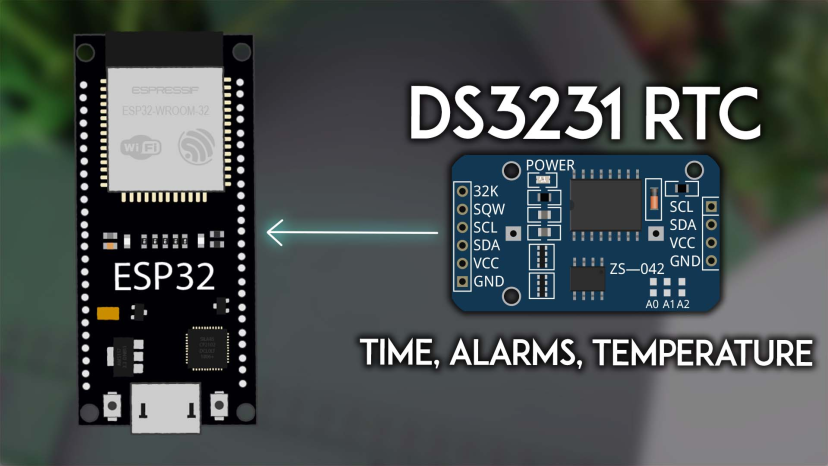
先认识 DS3231:一块带电池的小时钟
DS3231 内部用的是 32kHz 温补晶振(TCXO),会按温度自动补偿,所以不容易跑偏,这是它比 DS1307 这类老模块准的地方。它跟 ESP32 之间走 I2C 通信,模块地址默认 0x68;板上还挂了一颗 24C32 EEPROM,地址 0x57,可以存点掉电不丢的数据。
模块侧面有个电池座,装一颗 LIR2032 充电纽扣电池,断电后照样计时,闹钟设置也不会丢。提示:别装 CR2032 这种不可充电的电池——模块默认带充电电路,除非把充电回路里标着 R4 的那颗电阻焊掉断开,否则有风险。
除了走时间,它还能存两组闹钟、把 SQW 引脚输出 1Hz、4kHz、8kHz、32kHz 四档方波,温度也能读出来,这几样后面都会碰到。
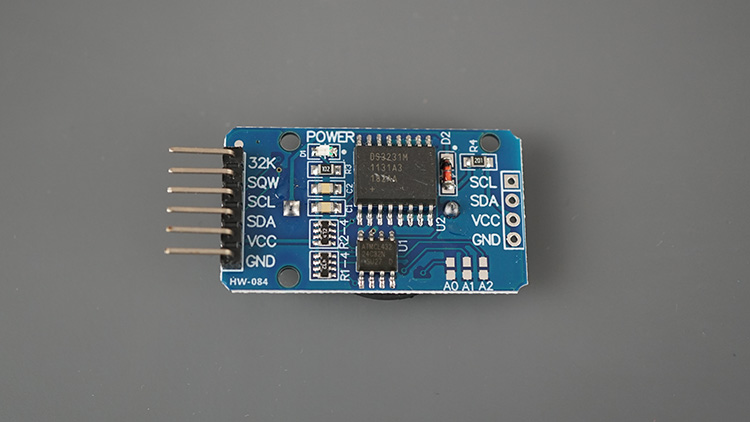
接线:五根线的事
DS3231 模块的引脚一排六个:32K、SQW、SCL、SDA、VCC、GND。跟 ESP32 连五根线就够:
- SCL 接 GPIO22
- SDA 接 GPIO21
- VCC 接 3V3
- GND 接 GND
- SQW 接 GPIO4(用别的数字脚也行,玩闹钟中断时用它)
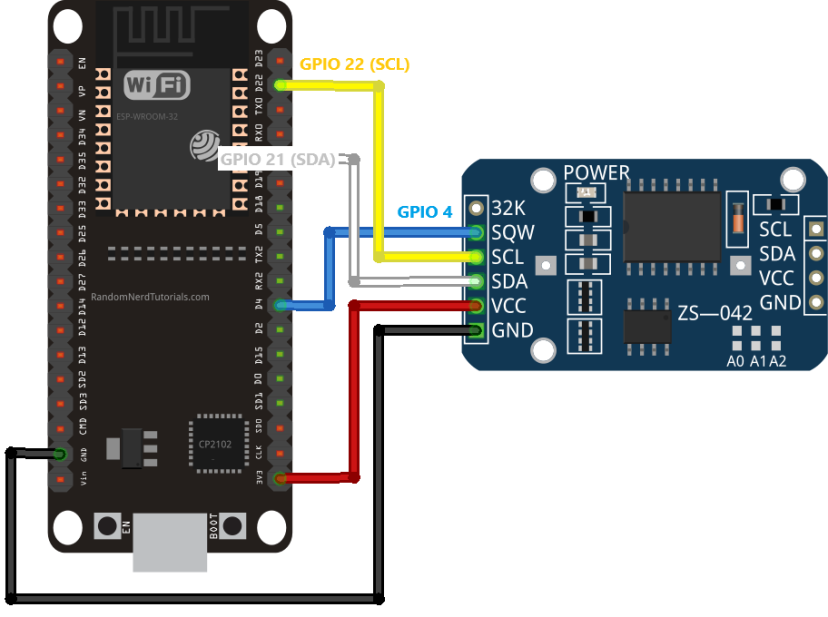
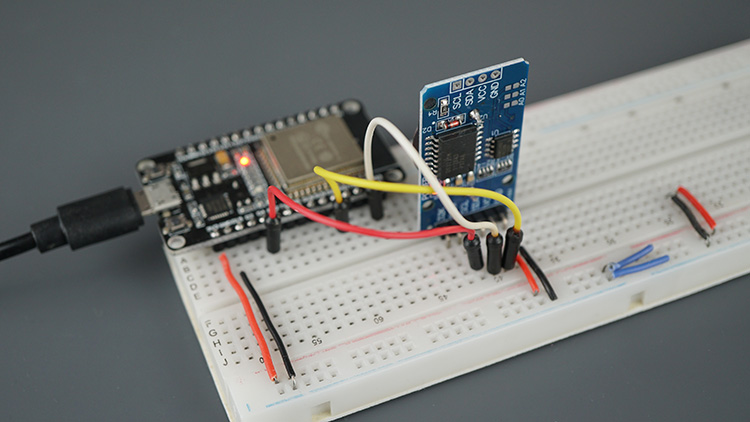
电路连出来就是上面这样,I2C 两根线加供电,SQW 留着给闹钟。
装 RTCLib 库
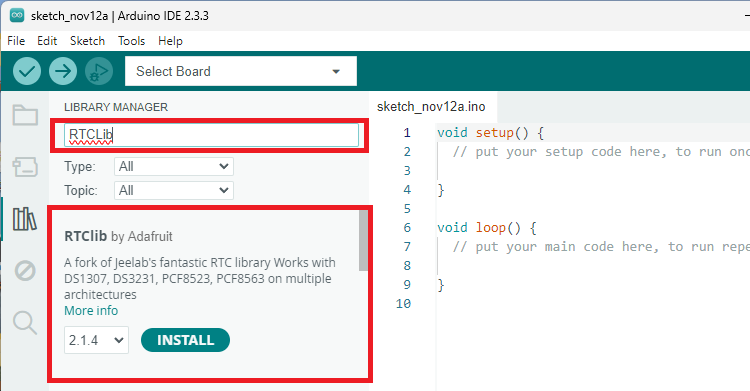
用 Arduino IDE 编程,前提是 ESP32 开发板环境已经装好。驱动 DS3231 用 Adafruit 的 RTCLib 库,同一个库还兼容 DS1307 和 PCF8523。打开菜单里的 Sketch - Include Library - Manage Libraries,搜 RTCLib,认准 Adafruit 那个点安装,本篇代码用的是 2.1.4 版。
设置时间、读出时间
用 RTC 模块就两步:先把当前时间写进去,之后模块自己保持走时。第一次上电或者换过电池,rtc.lostPower() 会返回 true,这时把编译时间写一次就行,也可以直接给一个明确的日期时间。下面的完整示例每 3 秒读一次时间并打印,顺手把模块温度也读了出来:
/*********
  Rui Santos & Sara Santos - Random Nerd Tutorials
  Complete instructions at https://RandomNerdTutorials.com/esp32-ds3231-real-time-clock-arduino/
*********/

// Based on the RTCLib Library examples: https://github.com/adafruit/RTClib
// Date and time functions using a DS1307 RTC connected via I2C and Wire lib
#include "RTClib.h"

RTC_DS3231 rtc;

char daysOfTheWeek[7][12] = {"Sunday", "Monday", "Tuesday", "Wednesday", "Thursday", "Friday", "Saturday"};

void setup () {
  Serial.begin(115200);

  if (! rtc.begin()) {
    Serial.println("Couldn't find RTC");
    Serial.flush();
    while (1) delay(10);
  }

  if (rtc.lostPower()) {
    Serial.println("RTC lost power, let's set the time!");
    // When time needs to be set on a new device, or after a power loss, the
    // following line sets the RTC to the date & time this sketch was compiled
    rtc.adjust(DateTime(F(__DATE__), F(__TIME__)));
    // This line sets the RTC with an explicit date & time, for example to set
    // January 21, 2014 at 3am you would call:
    //rtc.adjust(DateTime(2014, 1, 21, 3, 0, 0));
  }

  // When time needs to be re-set on a previously configured device, the
  // following line sets the RTC to the date & time this sketch was compiled
  //rtc.adjust(DateTime(F(__DATE__), F(__TIME__)));
  // This line sets the RTC with an explicit date & time, for example to set
  // January 21, 2014 at 3am you would call:
  //rtc.adjust(DateTime(2014, 1, 21, 3, 0, 0));
}

void loop () {
  // Get the current time from the RTC
  DateTime now = rtc.now();

  // Getting each time field in individual variables
  // And adding a leading zero when needed;
  String yearStr = String(now.year(), DEC);
  String monthStr = (now.month() < 10 ? "0" : "") + String(now.month(), DEC);
  String dayStr = (now.day() < 10 ? "0" : "") + String(now.day(), DEC);
  String hourStr = (now.hour() < 10 ? "0" : "") + String(now.hour(), DEC);
  String minuteStr = (now.minute() < 10 ? "0" : "") + String(now.minute(), DEC);
  String secondStr = (now.second() < 10 ? "0" : "") + String(now.second(), DEC);
  String dayOfWeek = daysOfTheWeek[now.dayOfTheWeek()];

  // Complete time string
  String formattedTime = dayOfWeek + ", " + yearStr + "-" + monthStr + "-" + dayStr + " " + hourStr + ":" + minuteStr + ":" + secondStr;

  // Print the complete formatted time
  Serial.println(formattedTime);

  // Getting temperature
  Serial.print(rtc.getTemperature());
  Serial.println("ºC");

  Serial.println();
  delay(3000);
}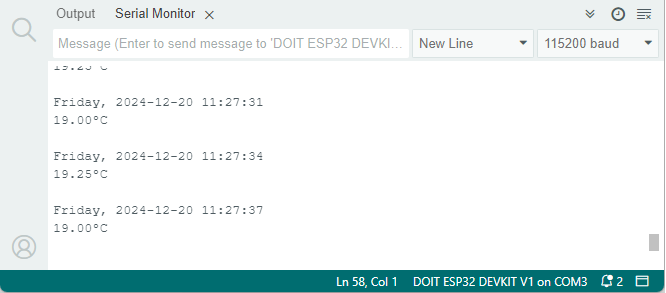
串口监视器跑起来是上面这样:星期、年月日、时分秒一整串,后面跟一行模块测到的温度。这个温度严格说是晶振附近的温度,本来就是拿来做温补的,顺带读出来估个环境温度也够用。
闹钟也顺手试一个
DS3231 能存两组闹钟,触发时 SQW 引脚会拉低,接个中断就能干别的事,比如把深度睡眠里的 ESP32 定时叫醒。设置闹钟的核心就一句 setAlarm1,时间之外再给个触发模式,DS3231_A1_Minute 表示分钟一匹配就触发:
// Schedule Alarm1 to fire when the minutes match
if(!rtc.setAlarm1(alarm1Time, DS3231_A1_Minute)) {  // this mode triggers the alarm when the minutes match
  Serial.println("Error, alarm wasn't set!");
}else {
  Serial.println("Alarm 1 will happen at specified time");
}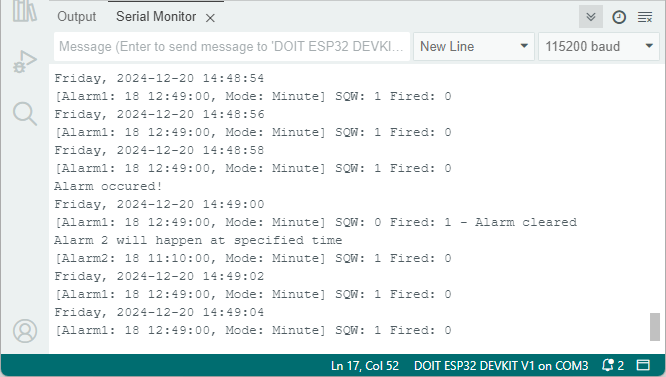
到点后串口会报闹钟触发,库自带示例里还有读回闹钟时间、清除闹钟标志的完整写法,照着 RTCLib 的 alarm 示例就能跑通。
收尾
整套下来就是:五根线接好、装 RTCLib、上电写一次时间,之后 ESP32 不管重启多少次,都从模块把时间读回来。一块十几块钱的小板子,换来断电不丢、还能定时叫醒主控的时钟,做定时数据记录、定时喂食器这类项目都用得上。




去年做过一个室外温度记录的小玩意,就是因为没上 RTC,ESP32 一重启时间就归零,记录的数据全对不上号。后来换了 DS3231 才算消停,温补晶振真的稳,一个月下来误差也就十几秒。文中提到 LIR2032 和 CR2032 的那个坑也提醒得好,我当时就踩过,模块充电电路一直给不可充电的电池硬灌,幸亏发现得早。
SQW 那根线不接也能正常走时间,想玩闹钟中断再补上,这个细节讲得挺清楚。
看完就去翻了翻抽屉,正好有一块吃灰的 DS3231,周末给它配块电池复活一下。
RTCLib 里 setAlarm1 的模式参数一开始我也没看懂,Minute 就是分钟匹配就触发,比想象中简单。