
做一条桌面机械臂,最先撞上的墙不是结构、不是算法,是引脚。Arduino Uno 一共 20 个 IO,其中能稳定做舵机 PWM 的更少,一条六轴机械臂就要吃掉 6 个;再想加个夹爪、加个云台,IO 立刻不够用,而且每多一个舵机,主控就要多分一份中断和运算给它,动起来容易一起抖。
PCA9685 这块板子解决的正是这件事:它自带一颗 16 通道、12 位分辨率的 PWM 控制器,主控只用两根 I2C 线(SCL、SDA)发指令,板子自己把 16 路 PWM 同时输出。理论上还能级联 62 块板,一路管到 992 个舵机,用的还是那两根线。这篇按 Adafruit 官方教程走一遍,重点讲两套电源别接反、舵机电流怎么算、以及脉冲宽度怎么校准。
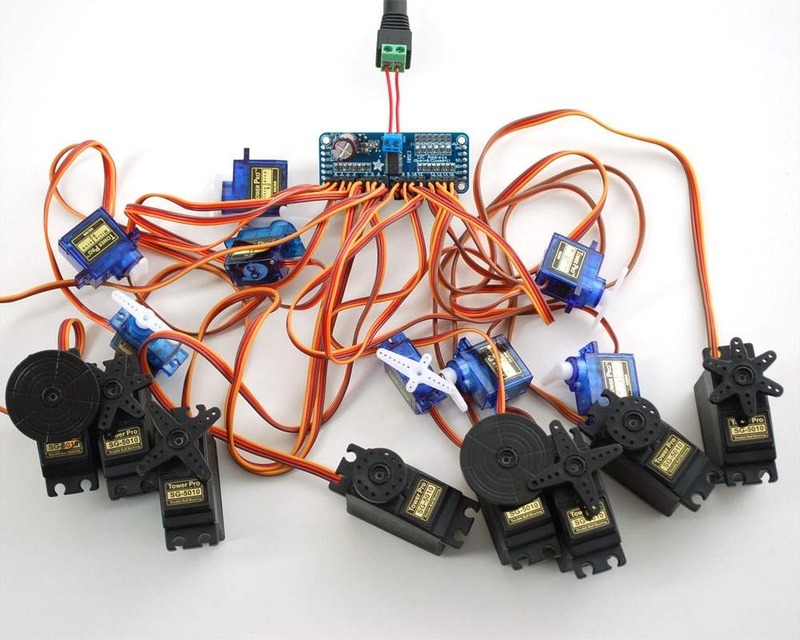
这块板到底替主控干了什么
用 Arduino 自带的 Servo 库也能驱动舵机,但每个舵机占一个引脚,而且 PWM 是靠定时器中断在软件里凑出来的,舵机一多,主控的时间片被切得很碎,跑传感器、跑串口都会受影响。PCA9685 把这件事下放到硬件:主控只需要通过 I2C 告诉它“第几路、脉宽是多少个 tick”,剩下的时序由板上的芯片自己数。
12 位分辨率意味着一个周期被切成 4096 份,舵机常用的 50 赫兹周期是 20 毫秒,一份大约 4.88 微秒,比舵机能分辨的精度细得多。所以做机械臂关节这种需要“慢慢挪一点点”的动作,比软件 PWM 稳。
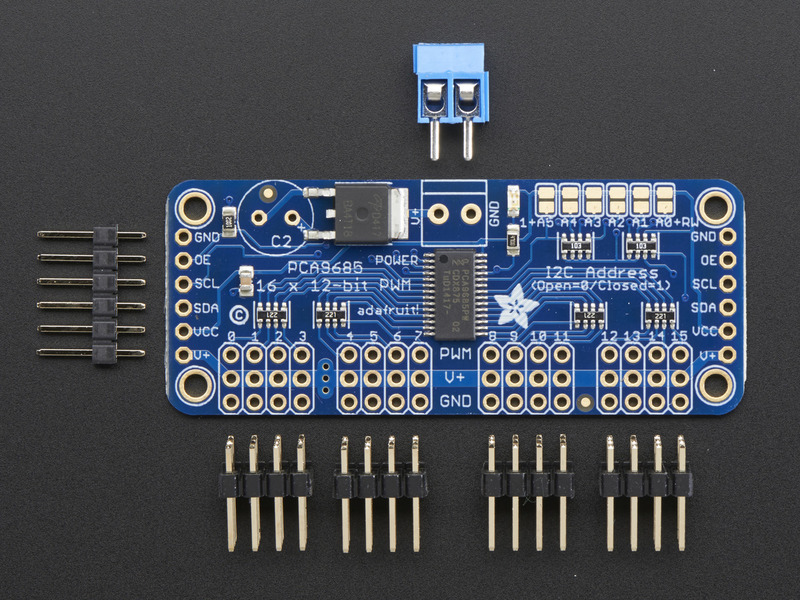
引脚与供电:VCC 和 V+ 千万别混
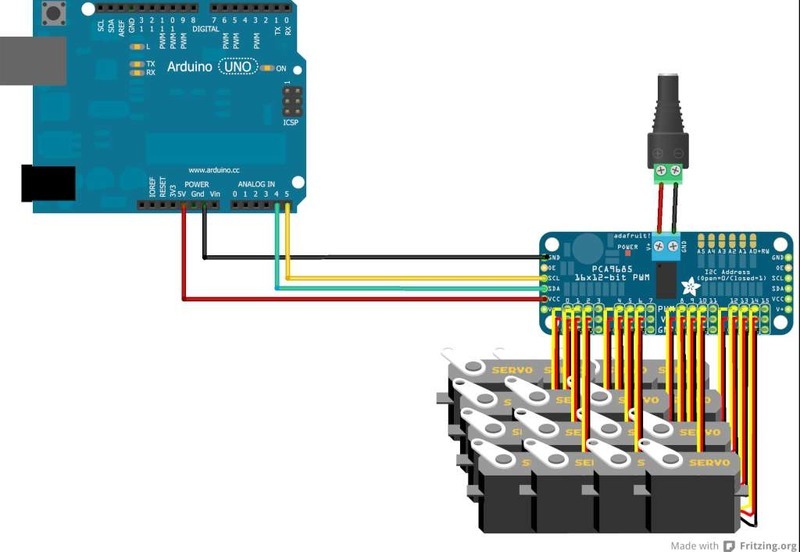
板子上有两套电源,这是新手最容易搞错的地方。VCC 是给芯片逻辑用的,接 3 到 5 伏,跟主控逻辑电平对齐;V+ 是给舵机用的功率电源,标称 5 到 6 伏,最高能到 12 伏,电流全从这儿出。两套电源的 GND 必须共地。
- VCC:3 到 5 伏,接主控的 5V 或 3V3,只喂芯片
- V+:舵机电源,5 到 6 伏最稳,别超过 12 伏
- GND:逻辑地和功率地都接这里,必须共地
- SCL、SDA:I2C 两根线,接主控对应引脚
- OE:输出使能,拉高会关掉全部输出,默认下拉为低,可以不接
还有两个细节:每路 PWM 输出前面串了 220 欧电阻,所以用它驱动 LED 时逻辑电平和 VCC 一致,别指望它当功率驱动;每路最大输出电流 25 毫安,是信号电流,不是舵机电流——舵机电流走的是 V+ 那三个针里的电源脚。
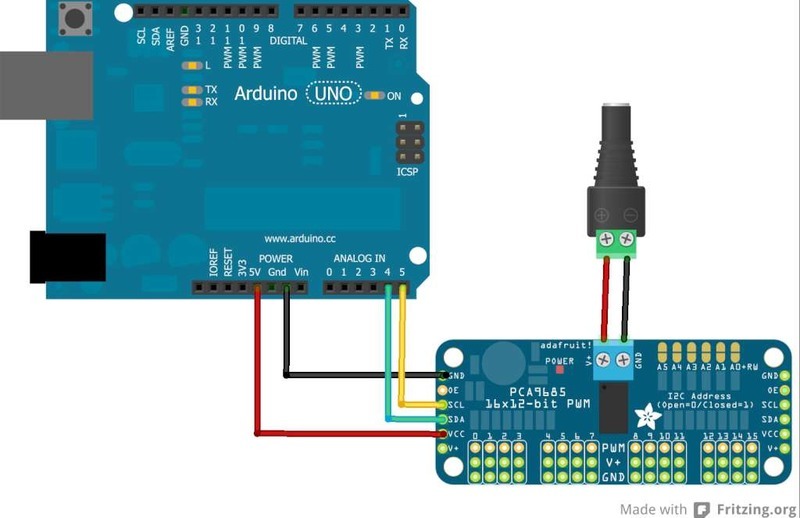
接线:主控两根线,舵机插三针
Arduino Uno 接 VCC 到 5V、GND 到 GND、SCL 到 A5、SDA 到 A4,四根线接完,主控这一侧就结束了。舵机插在板子边缘的 3x4 排针上,每路三个针依次是 PWM 信号、V+、GND,插的时候注意信号线(一般是橙或白)对着 PWM 那一列,别整排插反,插反了舵机会直接顶到极限位置一直憋着。
供电算账:一块板带 16 个舵机要多少电流
标准 hobby 舵机空载大概 350 毫安上下,堵转能到 1 安以上。16 个舵机全挂上去,按空载算就是 5.6 安,按堵转算是十几安。所以拿 Arduino 的 5V 引脚供电是绝对不够的,官方给的选择是 5 伏 2 安或 5 伏 10 安的开关电源,或者 4 节 AA 电池(碱性约 6 伏、镍氢约 4.8 伏)。
如果电源在大电流下会掉压,板子上留了一个电解电容的焊盘,官方给的经验公式是 n × 100 微法,n 是舵机数量。16 个舵机就是 1600 微法左右,装上去能明显减少动作瞬间的电压跌落和复位。
装库、跑示例,然后一定要校准
Arduino IDE 里搜 Adafruit PWM Servo Driver Library 装上,它依赖 Adafruit BusIO,一起装。装完在示例里找 servo,就是下面这段:它会依次驱动前 8 路的舵机来回扫一遍,用的是 setPWM 和 writeMicroseconds 两种写法,前者更精确、后者兼容 Arduino Servo 库的习惯。
/***************************************************
  This is an example for our Adafruit 16-channel PWM & Servo driver
  Servo test - this will drive 8 servos, one after the other on the
  first 8 pins of the PCA9685

  Pick one up today in the adafruit shop!
  ------> http://www.adafruit.com/products/815

  These drivers use I2C to communicate, 2 pins are required to
  interface.

  Adafruit invests time and resources providing this open source code,
  please support Adafruit and open-source hardware by purchasing
  products from Adafruit!

  Written by Limor Fried/Ladyada for Adafruit Industries.
  BSD license, all text above must be included in any redistribution
 ****************************************************/

#include "Wire.h"
#include "Adafruit_PWMServoDriver.h"

// called this way, it uses the default address 0x40
Adafruit_PWMServoDriver pwm = Adafruit_PWMServoDriver();
// you can also call it with a different address you want
//Adafruit_PWMServoDriver pwm = Adafruit_PWMServoDriver(0x41);
// you can also call it with a different address and I2C interface
//Adafruit_PWMServoDriver pwm = Adafruit_PWMServoDriver(0x40, Wire);

// Depending on your servo make, the pulse width min and max may vary, you
// want these to be as small/large as possible without hitting the hard stop
// for max range. You'll have to tweak them as necessary to match the servos you
// have!
#define SERVOMIN  150 // This is the 'minimum' pulse length count (out of 4096)
#define SERVOMAX  600 // This is the 'maximum' pulse length count (out of 4096)
#define USMIN  600 // This is the rounded 'minimum' microsecond length based on the minimum pulse of 150
#define USMAX  2400 // This is the rounded 'maximum' microsecond length based on the maximum pulse of 600
#define SERVO_FREQ 50 // Analog servos run at ~50 Hz updates

// our servo # counter
uint8_t servonum = 0;

void setup() {
  Serial.begin(9600);
  Serial.println("8 channel Servo test!");

  pwm.begin();
  /*
   * In theory the internal oscillator (clock) is 25MHz but it really isn't
   * that precise. You can 'calibrate' this by tweaking this number until
   * you get the PWM update frequency you're expecting!
   * The int.osc. for the PCA9685 chip is a range between about 23-27MHz and
   * is used for calculating things like writeMicroseconds()
   * Analog servos run at ~50 Hz updates, It is importaint to use an
   * oscilloscope in setting the int.osc frequency for the I2C PCA9685 chip.
   * 1) Attach the oscilloscope to one of the PWM signal pins and ground on
   *    the I2C PCA9685 chip you are setting the value for.
   * 2) Adjust setOscillatorFrequency() until the PWM update frequency is the
   *    expected value (50Hz for most ESCs)
   * Setting the value here is specific to each individual I2C PCA9685 chip and
   * affects the calculations for the PWM update frequency.
   * Failure to correctly set the int.osc value will cause unexpected PWM results
   */
  pwm.setOscillatorFrequency(27000000);
  pwm.setPWMFreq(SERVO_FREQ);  // Analog servos run at ~50 Hz updates

  delay(10);
}

// You can use this function if you'd like to set the pulse length in seconds
// e.g. setServoPulse(0, 0.001) is a ~1 millisecond pulse width. It's not precise!
void setServoPulse(uint8_t n, double pulse) {
  double pulselength;

  pulselength = 1000000;   // 1,000,000 us per second
  pulselength /= SERVO_FREQ;   // Analog servos run at ~60 Hz updates
  Serial.print(pulselength); Serial.println(" us per period");
  pulselength /= 4096;  // 12 bits of resolution
  Serial.print(pulselength); Serial.println(" us per bit");
  pulse *= 1000000;  // convert input seconds to us
  pulse /= pulselength;
  Serial.println(pulse);
  pwm.setPWM(n, 0, pulse);
}

void loop() {
  // Drive each servo one at a time using setPWM()
  Serial.println(servonum);
  for (uint16_t pulselen = SERVOMIN; pulselen < SERVOMAX; pulselen++) {
    pwm.setPWM(servonum, 0, pulselen);
  }

  delay(500);
  for (uint16_t pulselen = SERVOMAX; pulselen > SERVOMIN; pulselen--) {
    pwm.setPWM(servonum, 0, pulselen);
  }

  delay(500);

  // Drive each servo one at a time using writeMicroseconds(), it's not precise due to calculation rounding!
  // The writeMicroseconds() function is used to mimic the Arduino Servo library writeMicroseconds() behavior.
  for (uint16_t microsec = USMIN; microsec < USMAX; microsec++) {
    pwm.writeMicroseconds(servonum, microsec);
  }

  delay(500);
  for (uint16_t microsec = USMAX; microsec > USMIN; microsec--) {
    pwm.writeMicroseconds(servonum, microsec);
  }

  delay(500);

  servonum++;
  if (servonum > 7) servonum = 0; // Testing the first 8 servo channels
}
代码里 SERVOMIN 150、SERVOMAX 600 是“tick”值,不是角度也不是微秒,4096 份里取 150 到 600 这一段。不同品牌、甚至同品牌不同批次的舵机,实际行程对应的 tick 会差一点,所以官方专门留了校准步骤:先让 SERVOMIN 一点点往上加,直到舵机停在最小行程但还没顶到机械限位;再调 SERVOMAX,直到最大行程。别一次性跳几十,慢慢逼近,顶到硬限位会烧舵机齿轮。
校准完要做角度控制,用 Arduino 的 map 函数把 0 到 180 度映射到 SERVOMIN 到 SERVOMAX 就行,一行搞定。做机械臂时更常见的做法是把每个关节的限位单独记在数组里,避免某个关节转到顶死的位置。
最后两个容易忽略的点:一是板子默认 I2C 地址是 0x40,级联时靠背面的地址焊盘改成 0x41、0x42,代码里要对应声明两个对象;二是芯片内部振荡器标称 25 兆赫,实际在 23 到 27 兆赫之间,示例里把 setOscillatorFrequency 设成 27000000,如果你的舵机行程明显偏大偏小,可以在这个值附近微调。

电容那条我踩过。16 个 MG996R 一起动,电源瞬间掉到 4 伏出头,主控直接重启,加了两千微法才稳下来。按 n×100 微法算,16 个也就 1600,建议往上留点余量。
SERVOMIN 和 SERVOMAX 校准真的不能省。我照默认值直接跑,两个关节顶到限位咔咔响,吓得赶紧断电,齿轮差点崩了。
想问下用 ESP32 带这块板,VCC 接 3V3 就行吧?舵机电源另外给。我这么接舵机不动,怀疑是 I2C 引脚没对上。
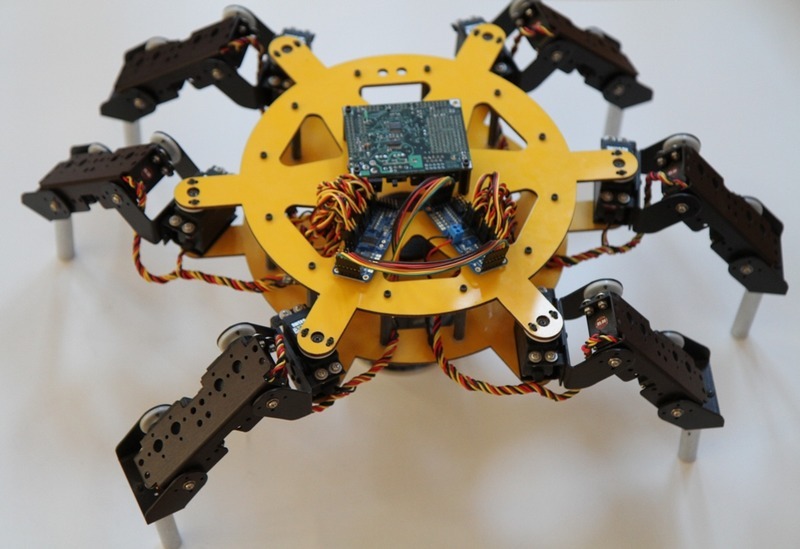
我的六足机器人就是用两块 PCA9685 级联,第二块把背面地址改成 0x41,代码里声明两个对象,确实把主控的引脚全省下来了。唯一麻烦是要给两块板都留 V+ 电源线。
补个坑:V+ 别上 3S 锂电。我第一次直接接了 12.6 伏,舵机抖得厉害还发热,后来降到 6 伏才正常。官方写最高 12 伏,但普通舵机真扛不住。